Software
Start faster, work more efficiently, capture richer data - a closer look at Frontline
%20(1).png)
At a glance:
- In April 2026 we launched Frontline - our next-generation mobile app and the field mobility component of the Obzervr Digital Work Management Solution. This article takes a closer look at what's new.
- Every refinement in the Frontline App serves one of three goals - helping maintenance teams start faster, work more efficiently, and capture richer field data.
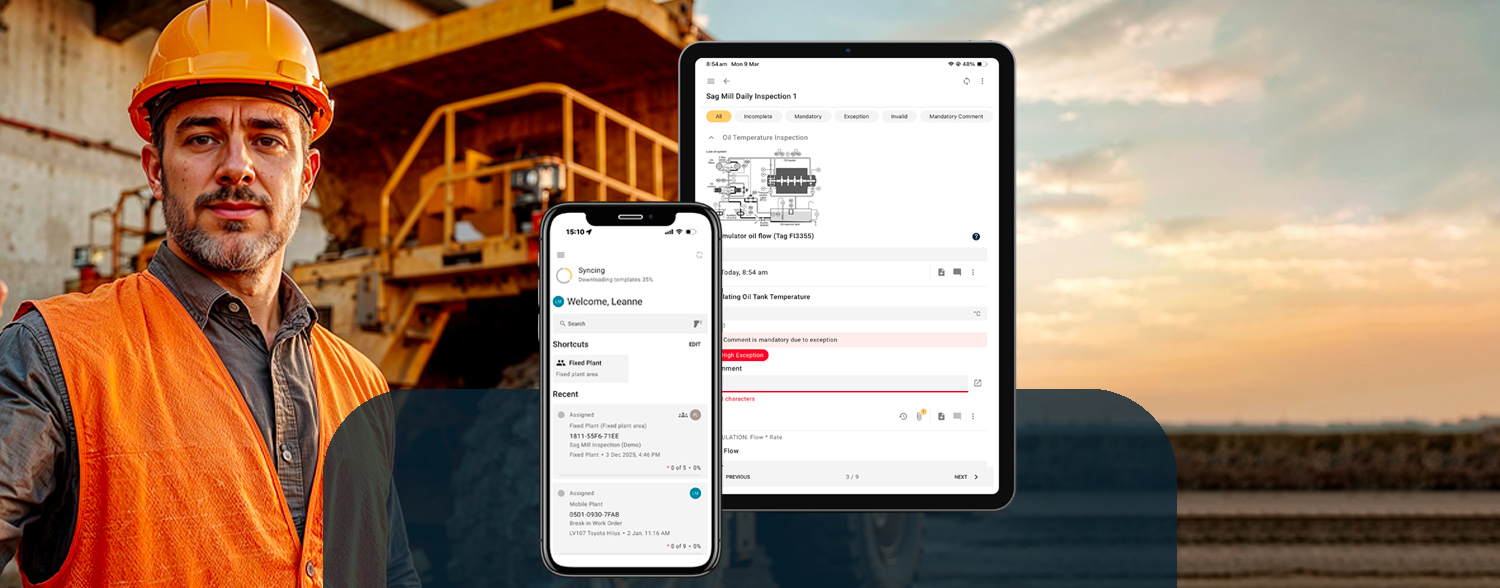
- A new Quick Access Home Screen brings search, customisable team shortcuts and recent work together in one place - so the start of every shift is quicker and more focused.
- Streamlined work order navigation, faster syncing, and a leaner, more responsive app reduce friction throughout the shift - including faster in-field new work requests.
- New rich media capabilities - including video with audio, speech-to-text notes, enhanced annotations and embedded reference materials available offline - bring more context and quality to the data captured at the source.
- Beyond new features, Obzervr's Frontline App has been built on next-gen technology which provides the strong foundations for future innovations such as AI integrations and new connectivity options.
In April 2026, we launched Frontline - our next-generation mobile app that replaces our long-standing Capture App as the mobile component of the Obzervr Digital Work Management Solution. Our launch announcement covered what Frontline is, what's new, and what it means for our customers.
This article goes a little deeper into the new features and enhancements that improve the day-to-day work of field technicians, supervisors, asset maintenance planners, and the people who rely on the critical data captured from the field. Importantly, Frontline has been built around how technicians actually carry out work in the field — and around 3 clear goals: helping users start work faster, work more efficiently, and capture richer data for actionable insights.
Helping maintenance technicians start work faster
Industry research suggests that maintenance technicians spend less than 25% of their shift on the tools¹. Closing that gap is one of the most direct levers an organisation has on maintenance productivity - and helping technicians find their work, understand what needs to be done, and start working faster is one of the most direct ways to do it.
The Obzervr Frontline App includes the following new features and enhancements to help mining maintenance technicians do just that - reducing the time spent navigating through lists or menus - providing quick access to the right information at the right time and reducing the small, everyday navigation taps and scrolls that quietly add up across a shift.
Quick access home screen
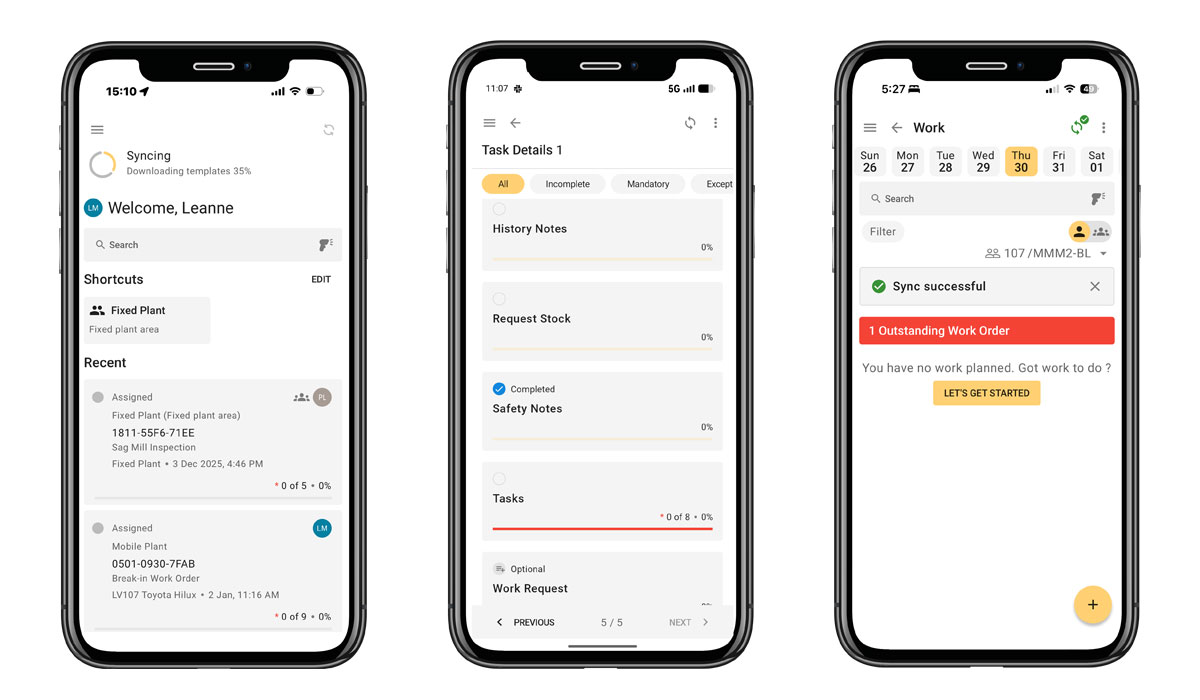
The Obzervr Frontline App includes a new clutter free quick access home screen that brings together the following core navigation features in one place - visible from the moment the technician logs in:
RECENT WORK LIST:
- Allows technicians to quickly view the last ten work items they accessed on the device or were recently assigned.
- Technicians can quickly return to their current work in a single tap from the home screen, even after closing the app - all without navigating back through work lists or screens.
CUSTOMISABLE SHORTCUTS:
- Users can pin up to 6 Shortcuts to teams they regularly work with or forms they regularly complete - ideal for those who complete the same or similar work daily.
- Shortcuts are configurable by the user (visible when they are logged into the device that they created shortcuts in) allowing them to quickly access the assignments or teams they use most - reducing the need to scroll through lists on screen.
SEARCH BAR:
- The Search Bar at the top of the Home Screen allows users to quickly search people, assets, teams, part or locations using titles, names, titles, work IDs, asset references, descriptions or part numbers.
- Search by alphanumeric, as well as barcode and QR code scanning for faster, more accurate identification of assets or parts in the field. Search results can be further filtered by status, assigned to or operator.
Quick start landing pages
FIRST PAGE with next required task:
- When a technician selects a work order to start or resume, Frontline will open to the first page with the next required task. This allows the technician to get started quickly without extra navigation steps or field searching.
- Where prerequisites apply, detailed page-level prerequisites ensure required tasks are completed in the correct order.
Faster shift handover
SINGLE-CLICK USER & TENANT SWITCHING:
Many mining and heavy industry maintenance teams share devices across shifts and crews, and some technicians working across multiple sites using the same device. This new function helps reduce friction and time at handover:
- Switch users or tenants (sites or business units) without re-authenticating - allowing technicians to quickly move between users profiles or mine sites (tenants) without logging out and then in again.
- Preserves per-user work view and audit trail - for mining and heavy industry organisations running pooled mobile device fleets, this feature removes user friction at shift change while preserving the user-level settings and audit trail behind every record. For technicians this means when they log back in, they can see their customised home screen and quickly go back to their assignments faster after a shift handover.
Helping maintenance teams work more efficiently
From inception, Obzervr's Digital Work Management Solution has been purpose-built to align with how asset maintenance teams work and the challenges they face everyday - especially in harsh, remote and fast-moving environments. Our Frontline App, as the critical mobile component of the Obzervr solution, is no exception.
As a boots-on-the-ground technology partner, we actively and regularly listen to the end-users of our technology solutions. During onsite visits, customer feedback channels and monthly check-ins, we hear first-hand from technicians, supervisors and planners about how they work, and where the friction points are in their work and tools. The Obzervr Frontline App has been shaped by those conversations along with our deep understanding of the digital transformation challenges our customers in mining and adjacent industries face.
Since launching Frontline, our customers are telling us that the features having the most immediate impact to their operations relate to work order navigation and speed to work - ie the next and previous buttons, collapsible sections, filtering down to the fields that still need attention, and forms that pick up exactly where you left off.
Streamlined work order navigation
Working through a work order the Obzervr Frontline App is light, clutter-free and intuitive. It features easy navigation and progress tracking features designed for everything from a quick equipment pre-start form to a long, multi-page inspection:
Single Tap Page Navigation:
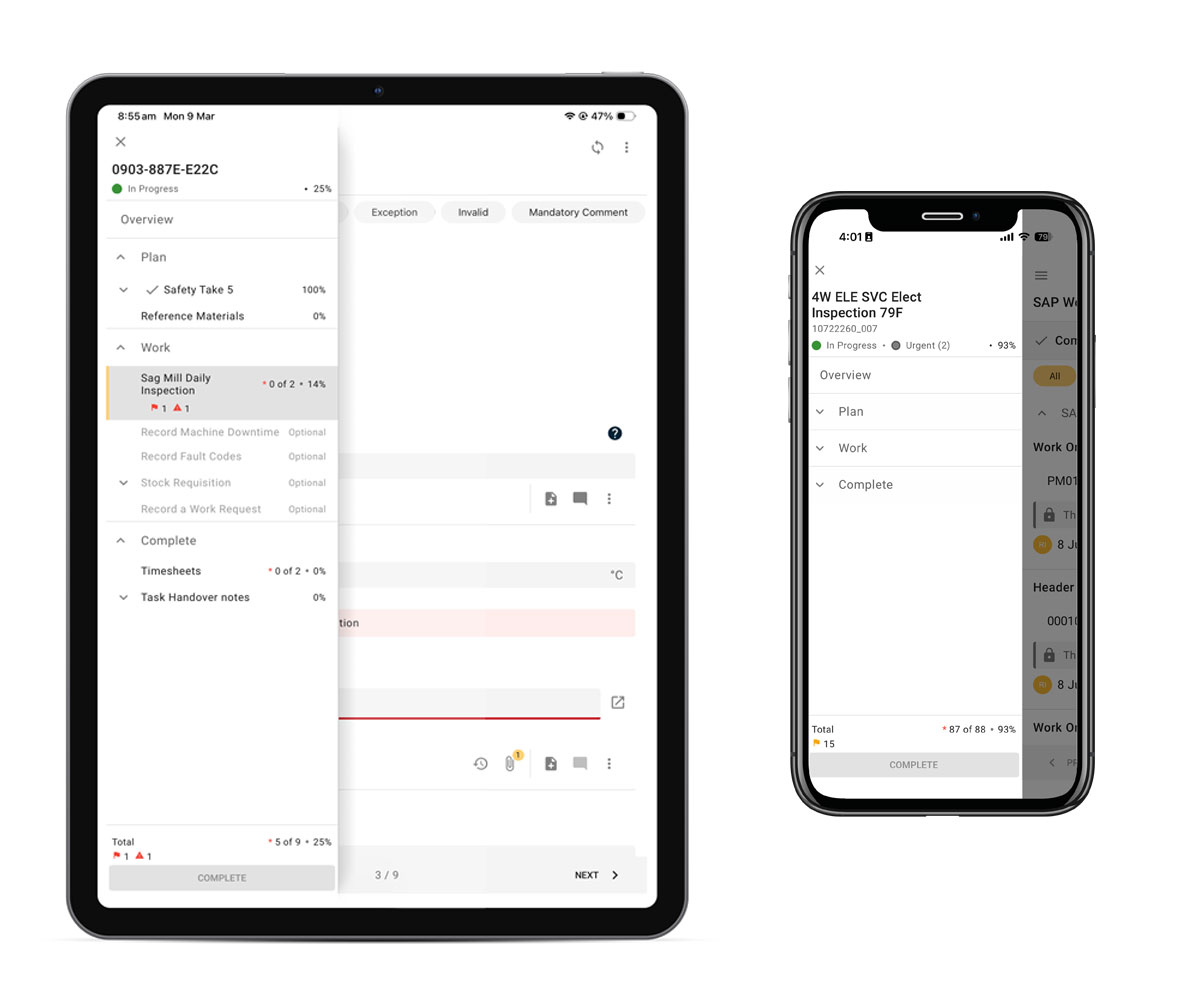
- Always on Table of Contents - Technicians can jump straight to the right page of a work order in a single tap. This is particularly useful for long work orders or inspection forms, or when returning to a specific section.
- Progress percentages are visible per section, and the 'Complete Work' button available directly from the Table of Contents when all required fields are completed.
collapsible sections:
- Stay focused on what's relevant - Each section in a work order can quickly be collapsed or expanded so field technicians can stay focused on what's relevant right now - reducing visual noise and scrolling.
Dynamic field filtering:
- Filter to view only fields that need attention, or are yet to be completed.
- Live field filtering dynamically updates the list as fields are completed or change state - keeping the view focused on what work still needs to be done.
BUILT-IN PROGRESS TRACKING:
- Quickly see work order progress - see what's been done, what's left, and what needs review - all at a glance.
Quick in-app work order requests
NEW WORK REQUEST PROCESS:
The Obzervr Frontline App features a new streamlined process for technicians to request break-in repairs or log follow-on work for unplanned issues - all captured digitally while the context is fresh.
- In-app work order creation in 3-5 steps - easy to follow steps guide technicians on what information is required to create a new work order from the field based on the nature of the issue and minimum information required.
- Auto-send to supervisor - once the work order request is created in the Frontline App, the request syncs to the Obzervr Cloud and flows back to supervisors and planners who can review and allocate the work via the Obzervr Supervisor Portal.
Fast and visible data syncing
Fast data sync:
- Frontline as part of the Obzervr platform, has a fast bi-directional sync with back-office systems including SAP and Pronto.
- Less wait time to get started - completed field data syncs with your systems of record sooner, and master data updates flow back to the technicians device with less wait.
- Automatic & manual data syncing - Frontline has 3 data sync modes - automatic on login, periodic background sync when online, and an on-demand manual sync via the sync icon on the home screen.
data sync status icon:
- A Data Sync Status icon located at the top of the home screen allows technicians to quickly view the status of the current data sync - if it is in-progress, has succeeded, or has failed.
- Instant visibility and certainty that the valuable data collected in the field has been synced from the mobile device, through to the Obzervr and to your ERP or CMMS.
- Enables a forced sync - users can tap the icon at any time to initiate a force sync if needed (see note above).
Capture video with audio
VIDEO UPLOAD FEATURE:
- Field technicians can record and upload short videos with audio, and attach them directly into the work order without leaving the app.
- Capture unusual noises or movements that are hard to describe in writing. Technicians can record a short clip of a vibrating pump while narrating what they see and hear.
- Gives office-based team real-life context, and eliminates misinterpretations that can come from paragraphs of written notes.
- Upload retrospectively - if a video is saved to the device, users can upload to the work order at anytime via the video attachment field from their devices photos/video gallery.
Enhanced annotations, comments & rich media
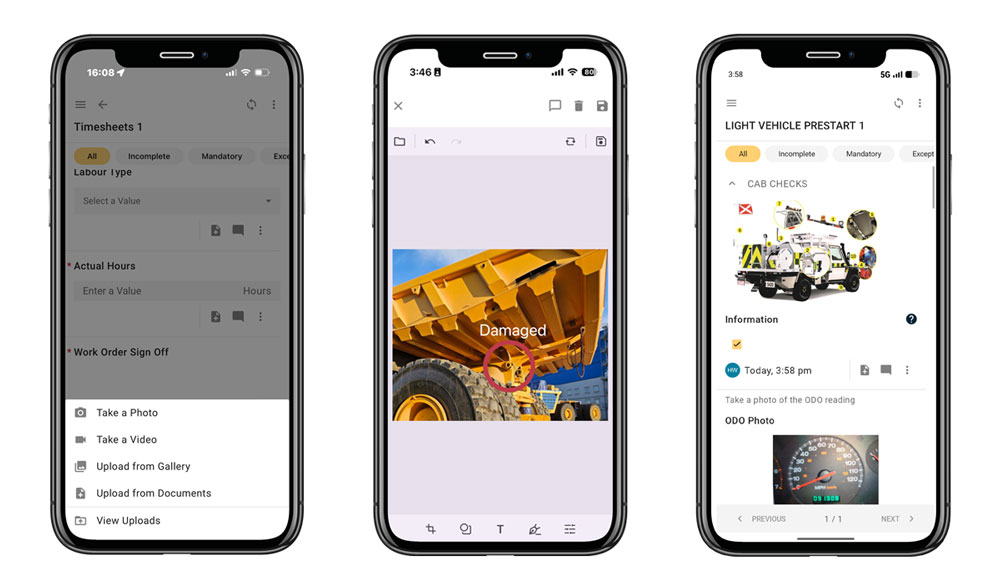
Frontline includes enhanced annotation, comment and rich media capture allowing technicians to add detail to work orders at the point of work - without leaving the app. These features are intuitive and will feel similar to how technicians already use their mobile devices - keeping the learning curve low.
Mark-ups, comments & images:
- Upload photos directly to the work order.
- Hand-draw mark-ups and annotations on images or files.
- Capture signatures with a smooth on-device drawing experience - each automatically linked to the relevant work record along with time, date and user identity.
- Add comments and contextual notes to the right field, on the right work order.
- Speech-to-text dictation - technicians can dictate notes by voice directly into notes fields of Frontline via the microphone icon, capturing detail at the speed of conversation.
Data sync status visibility improves confidence
As mentioned earlier, the fast data sync and highly visible status icon are both quiet, but important features for confidence in the data captured in the field. This turns a regular question - "did that actually sync?" - into a glance.
- For supervisors, asset managers and IT teams, it lifts confidence that data captured in the field has made it back to the office.
- For technicians, it provides reassurance that valuable data hasn't been lost.
“Our mission has always been to make life easier for the frontline technicians who carry out the essential work of keeping critical assets running. Frontline is not just a new app - it’s a commitment to our customers that we are continuously evolving our solutions to deliver the right capabilities and technologies needed to empowers their teams and drive operational excellence.”
TANIA DEVOTI, CEO & FOUNDER - OBZERVR
.png)
The critical link between the field and the office
Obzervr's Frontline Mobile App, like our long-standing Capture App that it replaces, is the critical link that connects the office and the field. As the mobile component of our Digital Work Management Solution, Frontline enables end-to-end digitisation of asset management operations. It turns what happens in the field into trusted, actionable data your business can rely on to improve asset performance, reduce maintenance costs and improve productivity.
Every change in Obzervr's Frontline App exists because real technicians, supervisors, asset maintenance planners and reliability leaders told us where the friction was, and where efficiencies could be gained.
More than new features and capabilities, our new Frontline App provides the strong tech foundations for what comes next. Built on modern next-gen technology, it's where future innovations such as AI integrations and new connectivity options will be delivered, without disrupting the work happening in the field today.
There is so much more to Frontline as part of the Obzervr Digital Work Management Solution...
Download the Obzervr Frontline Mobile App Infosheet to learn about all capabilities of our industry leading mining maintenance mobility and digital work execution app.
Sources: 1. Drew Troyer, 2025, as cited in 'How to accelerate standardised work and make it stick'