Software
One tap access to forms field crews use most, now on Obzervr Frontline
%20(1).png)
At a glance:
- From October 2026, any Form or Work Template your site has digitised in Obzervr can be saved as a home screen Shortcut on the Frontline Mobile App.
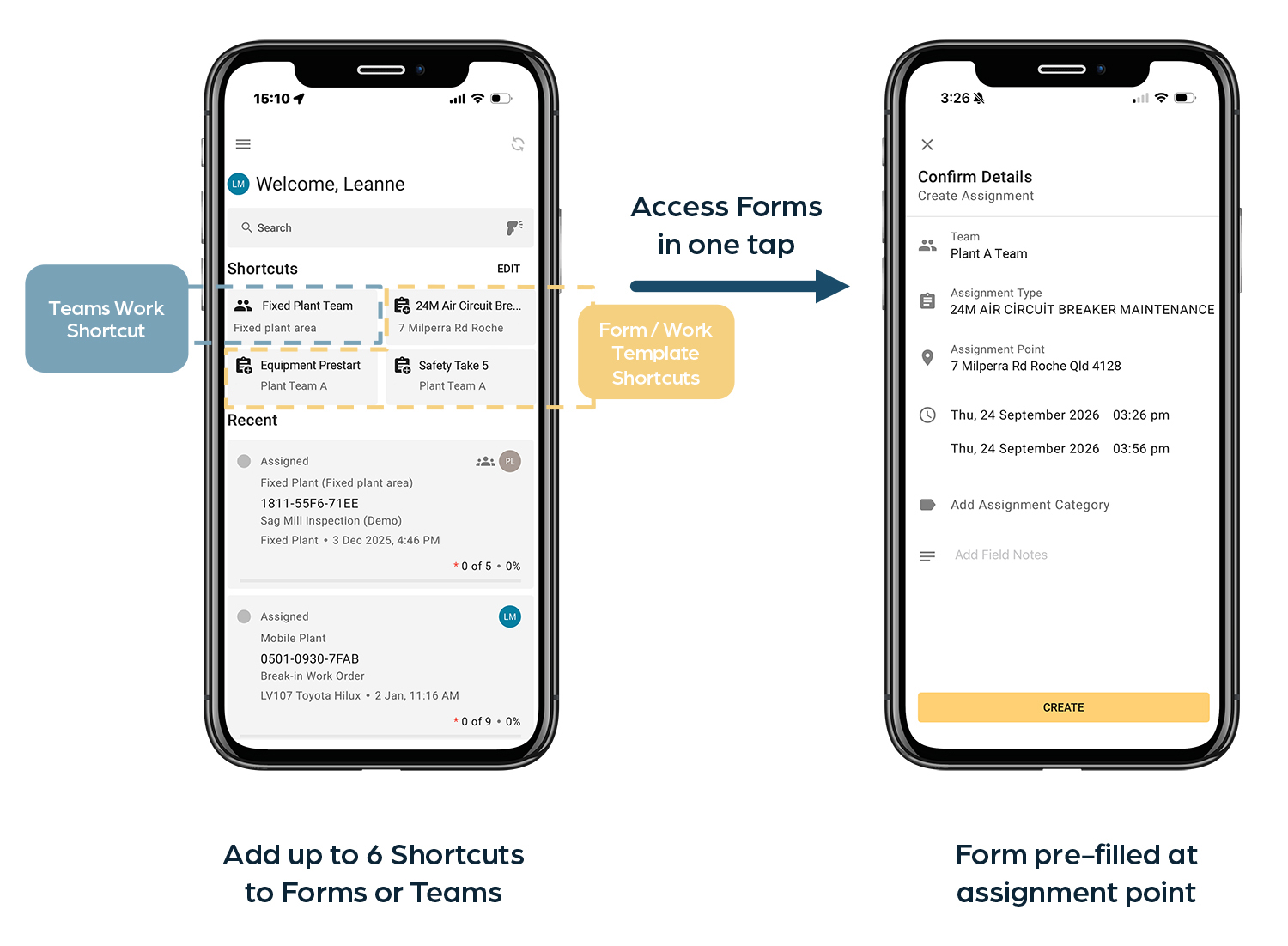
- Each device holds up to 6 shortcuts in the Frontline App in any combination of Forms or Team Work views.
- With Shortcuts, users can quickly access their frequently used Forms such as equipment pre-starts, safety take 5’s and inspections in just 1 tap.
- Shortcuts always open the latest published version of a Form, so your template governance carries on exactly as it is.
- This enhanced Shortcut feature will be automatically available to all Frontline App users from 15th October 2026 – importantly there is no implementation project or rollout plan required, nor is there any changes to the Form, your data or integrations.
- The Shortcuts feature works offline and on all iOS, Android and Windows smartphones and tablets.
- This feature will not be available for Obzervr Capture.
Introducing Frontline's improved Shortcuts feature
Obzervr's Frontline Mobile App launched in March 2026 with a home screen Shortcuts section which allowed shortcuts to 'My Team Work' views only. From October 2026, this Shortcuts section will have the capability to also save Forms/work templates shortcuts as well.
Quick access forms when the shift starts
Faster starts for Frontline Maintenance Technicians and Field Operators
- An equipment pre-start on the loader.
- A Safety Take 5 before a job, to assess and record risks.
- A service checklist on mobile plant that has hit its hour interval.
- An area inspection on the site walk-through.
These are the forms mining maintenance technicians or field operators complete more often than anything else - several times a day, every day. They know them by heart, but what they are looking for is the fastest possible way to complete them while staying compliant and safe.
Fewer questions for Supervisors
Ask a maintenance supervisor how many times they get asked where a form is - paper or digital, and the answer is: too often. This occurs most frequently when there is a contractor on site for a fortnight, an operator who opens Obzervr to complete two mandatory forms a shift, or a new technician still learning their way around the Obzervr Frontline App. When everyone on a mine site is under time pressure, what they want is the fastest, easiest and correct way to find and complete the forms they need to complete their job.
Making every shift start - frictionless
Picture a frontline technician opening the Frontline App on their smartphone or tablet at the start of a shift. At the top of the home screen are Shortcuts to their equipment pre-start forms, their Safety Take 5s, and the service checklist for their equipment class at their site. They tap the Shortcut, confirm the pre-filled details, and the form is created – all at the point of work.
Any form your site has digitised can be a Shortcut
If it exists as a form or work template in Obzervr, it can sit on the home screen as a Shortcut - regardless of if it originates in your CMMS or not or if it is required for operational compliance. Examples include:
- Equipment pre-starts and inspections
- Safety Take 5's and risk assessments
- Daily and periodic service checklists by equipment class
- Area and facility inspections
- Compliance audits
- Process plant preventative maintenance
- Lubrication tasks
How Frontline's new Shortcut feature works
Frontline launched in March 2026 with the ability to add Shortcuts that link to 'My Teams Work' views. This updated to the Shortcuts feature now allows Form shortcuts to be added as well Team Work views.
- Six Shortcuts per device - each device can have up to 6 Shortcuts on the home screen in any combination of Team Work views or Forms - enough for a crew's regular work while ensuring the home screen stays readable.
- Access Forms in 1 tap - when saved, a Shortcut holds the form, the asset or location of the work, and the team the work is associated with.
- When all three criteria are saved with the Shortcut, the form opens in 1 tap. The user then confirms the details and starts completing the form.
- If a Shortcut is saved without the asset or location, the field crew simply choose the correct asset or location at the point of work, confirms the details and starts completing the form.
- Automatic current date & time - a form accessed through the Shortcut will automatically use the current date and time everytime it launches, so every record carries the correct time for that shift.
- Always the latest published digital form - when a form or work template is republished by the template admin (via Obzervr Work Designer), the Shortcut follows automatically - so the most current published version is always the one that opens from the Shortcut. There is no relinking and nothing to rebuild.
- No implementation project - Form Shortcuts is a feature upgrade that will be automatically released to the Obzervr Frontline App in October 2026. Users will be able to access the feature next time they open the app. Importantly, no implementation or rollout plan is required - just a short walkthrough for users on how to add and delete Shortcuts on their device.
- Nothing new to learn - the forms, data and integrations do not change, so there are no new forms or processes for a user to learn – just a quicker, easier path to get to their most used forms.
- Shortcuts stay with the device - not user logins - Shortcuts in Frontline stay with the device the app is installed on rather than a user's login. This is particularly useful for shared or vehicle mounted devices that run the same forms every shift. Regardless of who logs in, they will access the saved Shortcuts, pre-filled with the associated team, asset or location and form details. Shortcuts can be quickly added and deleted by device users.
- Always accessible offline - all Shortcuts and related forms or teams behind them are available even when the device is offline, and then syncs when back online. Shortcuts work on iOS, Android and Windows smartphones and tablets.

The two most compelling uses for Form Shortcuts
Both point to the same underlying capability: any digitised template — service checklists, area inspections, compliance audits, work requests — can be set up as a Shortcut the same way.
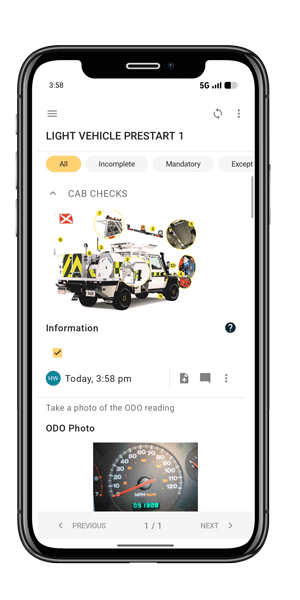
Equipment Prestarts
Pre-starts are the highest-frequency form in Frontline — often completed several times a day by the same operator, usually for the same vehicle, shift after shift.
They're mandatory safety checks, so friction doesn't just cost time: it risks the check being rushed, skipped, or worked around. Maintenance, operations and contractor crews all run them, making pre-starts the widest-reaching example of where Frontline Form Shortcuts help.
This improved Shortcut feature means that field technicians don't need to step through selecting a Team, Form and Asset every time they need to complete the form. Instead, a Shortcut on the home screen saves all those details once, so the form opens with these details already pre-filled — the technician or operator confirms the details and starts the check.
For vehicles mounted with their own tablet running Frontline, the same prestart is ready to go. For teams with shared devices, common forms the whole team uses are saved on the device, regardless of the login.
Safety Take 5s
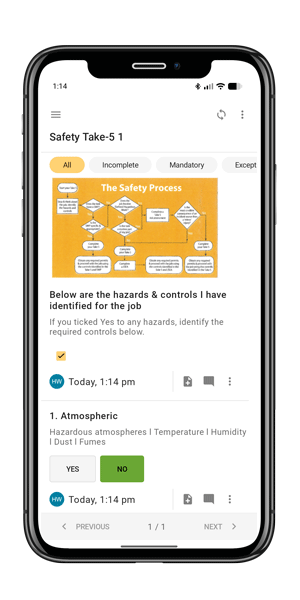
Safety Take 5s happen even more often than pre-starts — not once per vehicle, but before every task, wherever that task is.
That's exactly why, in the past, it's been harder to get to these quickly: the location changes constantly, so there was no single fixed setup to fall back on. The new Form Shortcut has been designed for this exact situation — the Team and Form are saved in the Shortcut. When the form is launched, the user selects the location, confirms the details and starts completing the form. This reduces friction and improves safety and risk compliance by keeping the form one tap away, no matter where the next job is.
Because a Safety Take 5 exists to make someone genuinely stop and assess risk before starting work, friction here has a sharper consequence than most forms: if getting to it is a hassle, the thing that suffers is the pause itself. Making the form quick to reach and easy to complete digitally protects the one moment in the job that's meant to slow people down on purpose, while ensuring data syncs back to business systems for real-time reporting.
What Shortcuts mean for maintenance crews and their managers
- Frontline technicians and operators:
- quickly access the forms your complete every shift in 1 tap - such as equipment prestarts, safety take 5's and inspections
- stay on top of your mandatory risk and compliance checks without slowing down your work
- eliminate the need to switch systems/apps or using paper-based forms
- Supervisors and superintendents:
- spend less time directing team members to forms - paper or digital
- improve completion, accuracy and reporting of mandatory operational and safety check requirements
- reduce the reliance of paper-based for and the associated sorting and rekeying
- keep routine work inside the digital process - ensuring all records land sync back to your business systems.
- Safety and compliance teams:
- get more complete, accurate and timely data in your system of record
- improve form completion and compliance due to forms being faster and easier to access
- ensures the right, most up-to-date forms are always being completed
- Template and master-data owners:
- Templates and master data are not impacted by Shortcuts - so owners can carry on exactly as before.
- Because Shortcuts point to the published template, governance, endorsement and publishing workflows are untouched.
- If something outside of the Shortcut changes, the Shortcut will flag to the user and disable - rather than opening out-of-date forms.
- Maintenance and asset managers:
- will see the compounding effect of faster shift starts and more complete forms across equipment pre-starts, Safety Take 5s, service checklists, inspections and audits.
- reduced friction, frustration and workarounds by field crews - with quick easy access to what they need
- ERP and CMMS-generated work and non-CMMS operational forms can site behind the same home screen Shortcuts - so a defect raised in a form still becomes a work request in SAP, Pronto or your CMMS.
When does Frontline's Form Shortcuts ship?
The Form Shortcuts feature will be automatically updated in Frontline on the 21st October 2026 for those customers using Obzervr and our Frontline Mobile App.
Once released, users with the Frontline App installed can start setting Shortcuts per device.
Importantly, this feature release doesn't need an implementation project or rollout plan - as nothing changes in how your forms are digitised, how your templates are governed, or how your data reaches your ERP.
For existing Obzervr customers, your Customer Success Manager will be in touch to run you through this feature and share Quick Reference How-To guides for you and your team to learn how to add and remove Shortcuts.
.png)
Not using Obzervr Frontline for digital work execution?
Request a 30min demo and discovery session via the (see button below) to see how Shortcuts on our Frontline Mobile App can make each shift start, faster and easier.